Settings
In the Settings window, you can configure search preferences that apply to all search methods, including the Advanced Search method.
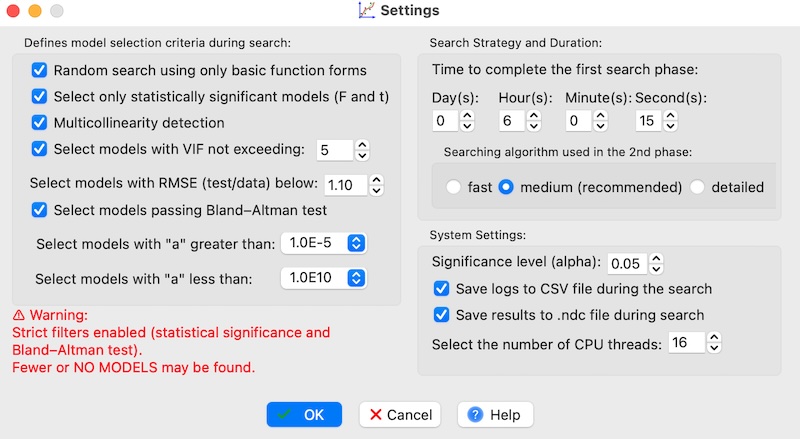
This window allows you to define global search parameters and select the following options:
-
The "Random search using only basic function forms" checkbox — enables the use of basic functions from the selected function set, such as integer powers, square and cubic roots, basic trigonometric functions, and logarithmic functions, if they are available in the chosen search configuration.
This option allows for quick identification of the most suitable regression model during the initial phase of exploration.
It can also be used to reveal physical relationships directly from the data.
In later stages, the model can be refined by expanding the search to include the full range of functions.
This option is available for both the Random Search method and as the initial step in the Advanced Search method.
When using a custom collection of user-defined functions, the user can freely decide which functions are treated as the simplest ones by inserting a line containing the symbol
#in the function list. All functions listed above this line will be interpreted as simplest functions and used exclusively during this mode of random search. Detailed instructions can be found here. - The "Select only statistically significant models (F and t)" checkbox enables the program to select only those models that are statistically significant as a whole, based on the F-statistic (ANOVA F-test), and in which all individual predictors are statistically significant according to the t-statistic (Student’s t-test).
- The "Multicollinearity detection" checkbox — enables detection of multicollinearity in the model by calculating the Variance Inflation Factor (VIF)1 (details available here). Enabling this option causes the program to compute the VIF value for each predictor. Please note that activating this feature may slow down the search algorithm.
- The "Select models with VIF not exceeding:" option — restricts the search to models where the VIF of each predictor does not exceed the specified value. The default VIF limit is 5, but you can increase or decrease it. Activating this option ensures that only models with acceptable levels of multicollinearity are considered.
- The "Select models with RMSE (test/data) below:" option — limits search results to models where the ratio of the Root Mean Square Error (RMSE) on the test set to the RMSE on the entire dataset does not exceed the specified threshold. The recommended value is 1.05, which ensures that only models with a test-set RMSE no more than 5% higher than the dataset RMSE are displayed. Using this constraint promotes the selection of regression models that generalize well and are not overfitted to the data. This helps ensure the robustness and reliability of the resulting models. For more information about overfitting, click here.
- The "Select models passing Bland–Altman test" option — restricts the search to models whose residual distributions pass the Bland–Altman test. Enabling this option may significantly reduce the number of models found, but it improves the reliability of the selected ones.
- The "Select models with "a" greater than:" option — limits the search to models where the regression coefficient a is not smaller than the specified value. The default minimum is 1E-5. Setting this limit prevents coefficients from approaching numerical zero (e.g., 1E-7 or smaller), which could make the model unstable. A very low limit may lead to selecting models with excessively high exponents (e.g., x⁴, x⁶), while a too-high limit may overly restrict the number of valid models.
- The "Select models with "a" less than:" option — limits the search to models where the regression coefficient a does not exceed the specified value. Setting this constraint helps maintain numerical stability and prevents the inclusion of models dominated by excessively large coefficients. However, if the limit is set too low, it may reduce the number of models found.
- The Significance level (alpha): setting — specifies the statistical significance level used for parameter testing.
- The "Save logs to CSV file during the search" checkbox — enables saving search logs in a CSV file. The log file is created in the same folder as the loaded data file.
- The "Save results to .ndc file during search" checkbox — allows the program to automatically save results during the search process. Each time a new model is found, the project file is overwritten. This feature works only if a project file with the .ndc extension has already been created.
- The "Select the number of CPU threads:" setting — specifies how many CPU threads are used during the search. It is recommended to set this value equal to the number of physical cores in your processor for optimal performance. Avoid using too many threads, as it may overload the system and reduce efficiency. The optimal number depends on your processor type, available RAM, and the dataset size. As a general rule, the maximum number of threads can be set to approximately twice the number of physical cores.
Please note that selecting the options "Select only statistically significant models (F and t)" or "Select models passing Bland–Altman test" makes the search criteria much more restrictive. As a result, the program may find only a small number of valid models, or sometimes no models at all. This is expected behavior and simply means that very strict quality requirements have been applied to the search.
The Advanced Search method is a more complex version of the Random Search method in the first phase and the Randomly Iterated Search method in the second phase. In the "Advanced Search Preferences" box, you can configure this type of search and select:
- the time to complete the first phase search (i.e., random searching),
- the search algorithm in the second phase (i.e., randomly iterated searching):
- fast - performs only one iteration for the best model discovered in the first search phase;
- medium (recommended) - performs only one iteration for the top three models discovered in the first search phase;
- detailed - performs multiple iterations for the top three models discovered in the first search phase.