Overfitting Detection
Overfitting occurs when the statistical model has too many parameters in relation to the size of the sample from which it was constructed. This phenomenon is a common issue in machine learning and can also occur in complex regression models, particularly when multivariable models are built to describe empirical data accurately.
The ndCurveMaster program offers advanced algorithms to build complex multivariable models. However, under certain conditions, overfitting may occur.
In regression analysis with one independent variable, overfitting can often be detected visually in the graph:

However, in nonlinear regression involving multiple variables, visual detection of overfitting is not possible. To address this limitation, ndCurveMaster includes a robust overfitting detection technique.
The program uses the test set method to detect overfitting. ndCurveMaster can randomly select a portion of the data to use as a test set:

If you uncheck the "Random selection of a data sample" checkbox, the last records in the dataset will be selected as test data:

The number of records in the test set is determined by the percentage specified in the "Test Set Size %" field. You can enter a value with two decimal places in this field to precisely calculate the size of the test set.
After defining the test set, ndCurveMaster performs regression using the remaining data and compares the RMSE (Root Mean Square Error) values for the test set and the entire dataset to detect overfitting.
An example multivariable regression model might look as follows:
Y = a0 + a1 · x1^(-1/2) + a2 · (ln(x3))^8 + a3 · x1^0.45 · (ln(x4))^2 + a4 · exp(x1) · x2^1.3 · x3^0.95 + a5 · exp(x2)^1.5 · x3^0.45 · ln(x4)
Standard statistical analysis referring only to the dataset might fail to detect overfitting:

However, ndCurveMaster can detect overfitting by comparing the RMSE values of the test set and the dataset:
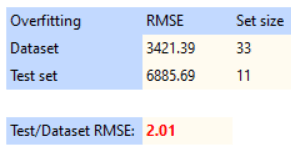
For example, the test set RMSE is 6885.69, while the dataset RMSE is only 3421.39. ndCurveMaster detects overfitting because the test set error is 2.01 times higher than the dataset error.
To mitigate overfitting, ndCurveMaster includes the "Test/Data RMSE Ratio cannot exceed" option. This feature limits search results to models where the ratio of test set RMSE to dataset RMSE does not exceed the specified threshold. By default, this value is set to 1.05, meaning that models with test errors exceeding 5% of the dataset error are excluded. To adjust this setting, navigate to the "Settings" menu, find the "Test/Data RMSE Ratio cannot exceed" option, and modify its value as needed. For more details, refer to the Settings page.
The overfitting effect can also be visualized in the graph below. Blue points represent the dataset, while red points represent the test set:
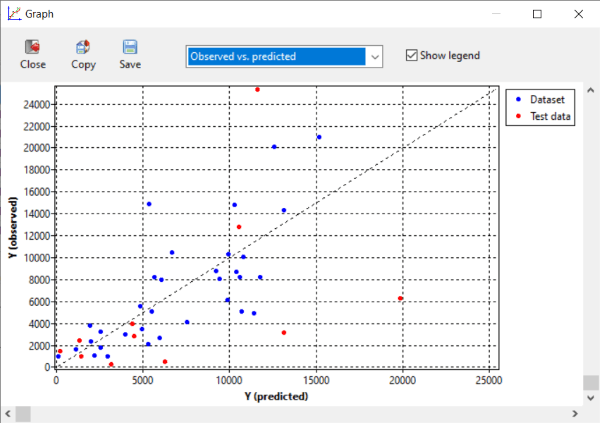
The graph shows that the model fits the dataset points perfectly, but its performance on the test set is poor, a clear indicator of overfitting.