The model equation window
The Model Equation window displays a collection of the best models found during the search. Each row contains the model id, RMSE, Pearson correlation coefficient, the model equation, and the AIC value.
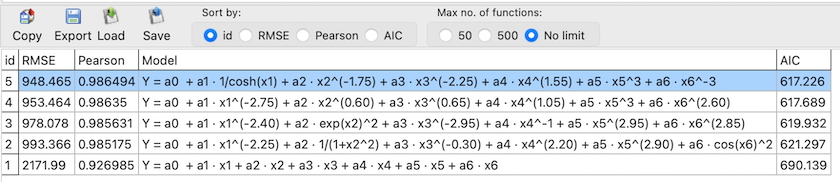
To help you compare results, the list can be sorted using the Sort by options: id, RMSE, Pearson, or AIC. Sorting by RMSE prioritizes models with the lowest prediction error, sorting by Pearson highlights models with the strongest linear agreement, and sorting by AIC favors models that achieve a good fit while avoiding unnecessary complexity.
The Max no. of functions option limits how many models are displayed in the table (e.g., 50, 500, or No limit). This is useful when many models have been found and you want to review only the top-ranked results.
Akaike Information Criterion (AIC)
The Akaike Information Criterion (AIC) is a standard model selection metric based on information theory. It combines goodness of fit with a penalty for the number of estimated parameters, helping to reduce overfitting. When comparing models fitted to the same dataset, a lower AIC indicates a more favorable balance between accuracy and complexity.
In ndCurveMaster, AIC is computed as:
AIC = n · ln(RSS / n) + 2k
- n — number of observations,
- RSS — residual sum of squares,
- k — number of estimated model parameters.
If an independent test dataset is loaded, the available sorting options in the Sort by section are adjusted. In this case, the Pearson correlation criterion is replaced by the Test/Data RMSE ratio.
The Test/Data RMSE criterion compares the prediction error obtained on the test set with the error calculated for the entire dataset. This ratio provides a direct indicator of model generalization performance. Values close to 1 indicate good generalization, while higher values suggest potential overfitting.
Using the Copy button, you can copy either the entire collection of models or a selected model to the clipboard in plain text format, or export the selected model in Python, C/C++, or Pascal format. With the Export button, you can save the collection to a CSV or TXT file. To save a selected model as an ndCurveMaster function, click Save, or load a function using Load. Multiple polynomial template functions can also be loaded using Load. Details are available in the Saving and Loading a Function from a File and Fitting Polynomial Regression sections.